2011年4月22日 星期五

java - 按鈕不重複

錯誤版

// with event
//Swing, JButton類別 有ActionListener
//Swing, JButton類別
import java.awt.*;
import java.awt.event.*;
import javax.swing.*;
public class SwingTestEvent extends JFrame implements ActionListener
{
//static JFrame myfrm=new JFrame("JButton class"); // Java Class JFrame
//static AwtTestEvent myfrm=new AwtTestEvent("JFrame 1 "); // Java Class JFrame
static JTextField tbx1=new JTextField(2); // 建立1文字方塊物件
static JButton buttons[]=new JButton[10];
static JLabel  labels[]=new JLabel [10];
public static void main(String args[])
{
SwingTestEvent myfrm=new SwingTestEvent();

String numbers[]  = {"0", "1", "2", "3", "4", "5", "6", "7", "8"};
FlowLayout flow=new FlowLayout();
GridLayout grid12= new GridLayout(1,2);
GridLayout grid33= new GridLayout(3,3);
myfrm.setLayout(grid12);
myfrm.setSize(450,450);
JPanel p1 = new JPanel(grid33); //實作  panel 1
for (int i = 0; i < numbers.length; i++)
{
buttons[i] = new JButton(numbers[i]); // create buttons
p1.add(buttons[i], grid33); // 在 panel 1內加入按鈕陣列
}

myfrm.add(p1); // 在視窗myfrm 內加入 panel 1
JPanel p3 = new JPanel(grid33); //實作  panel 3
for (int i = 0; i < numbers.length; i++)
{
labels[i] = new JLabel(); // create labels
p3.add(labels[i], grid33); // 在 panel 1內加入按鈕陣列
}
myfrm.add(p3); // 在視窗myfrm 內加入 panel 3

JPanel p2 = new JPanel(flow); //實作  panel 2
JButton btn1=new JButton("JButton 1"); // 建立按鈕物件 btn1
btn1.addActionListener(myfrm);
p2.add(tbx1); // 在 panel 2內加入文字方塊
p2.add(btn1); // 在 panel 2內加入按鈕

myfrm.add(p2); // 在視窗myfrm 內加入 panel 2


myfrm.setVisible(true);
}
public void actionPerformed(ActionEvent e)
{
String numbers[]  = {"0", "1", "2", "3", "4", "5", "6", "7", "8"};
String stringValue;
//stringValue=tbx1.getText();
//int intValue = Integer.parseInt(stringValue);
//System.out.println(intValue);
//labels[intValue].setText(stringValue);


int rm=(int)Math.random()*9;
System.out.println(rm);
numbers[0]=String.valueOf(rm);
tbx1.setText(numbers[0]);
buttons[rm].setBackground(Color.blue);
labels[rm].setText(numbers[0]);

}
}


正確版

// with event
//Swing, JButton類別 有ActionListener
//Swing, JButton類別
import java.awt.*;
import java.awt.event.*;
import javax.swing.*;
public class SwingTestEvent extends JFrame implements ActionListener
{
//static JFrame myfrm=new JFrame("JButton class"); // Java Class JFrame
//static AwtTestEvent myfrm=new AwtTestEvent("JFrame 1 "); // Java Class JFrame
static JTextField tbx1=new JTextField(2); // 建立1文字方塊物件
static JButton buttons[]=new JButton[10];
static JLabel  labels[]=new JLabel [10];
public static void main(String args[])
{
SwingTestEvent myfrm=new SwingTestEvent();

String numbers[]  = {"0", "1", "2", "3", "4", "5", "6", "7", "8"};
FlowLayout flow=new FlowLayout();
GridLayout grid12= new GridLayout(1,2);
GridLayout grid33= new GridLayout(3,3);
myfrm.setLayout(grid12);
myfrm.setSize(450,450);
JPanel p1 = new JPanel(grid33); //實作  panel 1
for (int i = 0; i < numbers.length; i++)
{
buttons[i] = new JButton(numbers[i]); // create buttons
p1.add(buttons[i], grid33); // 在 panel 1內加入按鈕陣列
}

myfrm.add(p1); // 在視窗myfrm 內加入 panel 1
JPanel p3 = new JPanel(grid33); //實作  panel 3
for (int i = 0; i < numbers.length; i++)
{
labels[i] = new JLabel(); // create labels
p3.add(labels[i], grid33); // 在 panel 1內加入按鈕陣列
}
myfrm.add(p3); // 在視窗myfrm 內加入 panel 3

JPanel p2 = new JPanel(flow); //實作  panel 2
JButton btn1=new JButton("JButton 1"); // 建立按鈕物件 btn1
btn1.addActionListener(myfrm);
p2.add(tbx1); // 在 panel 2內加入文字方塊
p2.add(btn1); // 在 panel 2內加入按鈕

myfrm.add(p2); // 在視窗myfrm 內加入 panel 2


myfrm.setVisible(true);
}
public void actionPerformed(ActionEvent e)
{
String numbers[]  = {"0", "1", "2", "3", "4", "5", "6", "7", "8"};
String stringValue;
//stringValue=tbx1.getText();
//int intValue = Integer.parseInt(stringValue);
//System.out.println(intValue);
//labels[intValue].setText(stringValue);


int rm=(int)(Math.random()*9);
System.out.println(rm);
numbers[0]=String.valueOf(rm);
tbx1.setText(numbers[0]);
buttons[rm].setBackground(Color.blue);
labels[rm].setText(numbers[0]);

}
}


按鈕會重複


// with event
//Swing, JButton類別 有ActionListener
//Swing, JButton類別
import java.awt.*;
import java.awt.event.*;
import javax.swing.*;
public class SwingTestEvent extends JFrame implements ActionListener
{
//static JFrame myfrm=new JFrame("JButton class"); // Java Class JFrame
//static AwtTestEvent myfrm=new AwtTestEvent("JFrame 1 "); // Java Class JFrame
static JTextField tbx1=new JTextField(2); // 建立1文字方塊物件
static JButton buttons[]=new JButton[10];
static JLabel  labels[]=new JLabel [10];
public static void main(String args[])
{
SwingTestEvent myfrm=new SwingTestEvent();

String numbers[]  = {"0", "1", "2", "3", "4", "5", "6", "7", "8"};
FlowLayout flow=new FlowLayout();
GridLayout grid12= new GridLayout(1,2);
GridLayout grid33= new GridLayout(3,3);
myfrm.setLayout(grid12);
myfrm.setSize(450,450);
JPanel p1 = new JPanel(grid33); //實作  panel 1
for (int i = 0; i < numbers.length; i++)
{
buttons[i] = new JButton(numbers[i]); // create buttons
p1.add(buttons[i], grid33); // 在 panel 1內加入按鈕陣列
}

myfrm.add(p1); // 在視窗myfrm 內加入 panel 1
JPanel p3 = new JPanel(grid33); //實作  panel 3
for (int i = 0; i < numbers.length; i++)
{
labels[i] = new JLabel(); // create labels
p3.add(labels[i], grid33); // 在 panel 1內加入按鈕陣列
}
myfrm.add(p3); // 在視窗myfrm 內加入 panel 3

JPanel p2 = new JPanel(flow); //實作  panel 2
JButton btn1=new JButton("JButton 1"); // 建立按鈕物件 btn1
btn1.addActionListener(myfrm);
p2.add(tbx1); // 在 panel 2內加入文字方塊
p2.add(btn1); // 在 panel 2內加入按鈕

myfrm.add(p2); // 在視窗myfrm 內加入 panel 2


myfrm.setVisible(true);
}
public void actionPerformed(ActionEvent e)
{
  String numbers[]  = {"0", "1", "2", "3", "4", "5", "6", "7", "8"};
String stringValue;
int rm;
//stringValue=tbx1.getText();
//int intValue = Integer.parseInt(stringValue);
//System.out.println(intValue);
//labels[intValue].setText(stringValue);

for (int i = 0; i < 9; i++)
{
rm=(int)(Math.random()*9);
System.out.println(rm);
numbers[i]=String.valueOf(rm);
buttons[i].setLabel(numbers[i]);
}


//tbx1.setText(numbers[0]);
//buttons[rm].setBackground(Color.blue);
//labels[rm].setText(numbers[0]);

}
}


按鈕不會重複


// with event
//Swing, JButton類別 有ActionListener
//Swing, JButton類別
import java.awt.*;
import java.awt.event.*;
import javax.swing.*;
public class SwingTestEvent extends JFrame implements ActionListener
{
//static JFrame myfrm=new JFrame("JButton class"); // Java Class JFrame
//static AwtTestEvent myfrm=new AwtTestEvent("JFrame 1 "); // Java Class JFrame
static JTextField tbx1=new JTextField(2); // 建立1文字方塊物件
static JButton buttons[]=new JButton[10];
static JLabel  labels[]=new JLabel [10];
public static void main(String args[])
{
SwingTestEvent myfrm=new SwingTestEvent();

String numbers[]  = {"0", "1", "2", "3", "4", "5", "6", "7", "8"};
FlowLayout flow=new FlowLayout();
GridLayout grid12= new GridLayout(1,2);
GridLayout grid33= new GridLayout(3,3);
myfrm.setLayout(grid12);
myfrm.setSize(450,450);
JPanel p1 = new JPanel(grid33); //實作  panel 1
for (int i = 0; i < numbers.length; i++)
{
buttons[i] = new JButton(numbers[i]); // create buttons
p1.add(buttons[i], grid33); // 在 panel 1內加入按鈕陣列
}

myfrm.add(p1); // 在視窗myfrm 內加入 panel 1
JPanel p3 = new JPanel(grid33); //實作  panel 3
for (int i = 0; i < numbers.length; i++)
{
labels[i] = new JLabel(); // create labels
p3.add(labels[i], grid33); // 在 panel 1內加入按鈕陣列
}
myfrm.add(p3); // 在視窗myfrm 內加入 panel 3

JPanel p2 = new JPanel(flow); //實作  panel 2
JButton btn1=new JButton("JButton 1"); // 建立按鈕物件 btn1
btn1.addActionListener(myfrm);
p2.add(tbx1); // 在 panel 2內加入文字方塊
p2.add(btn1); // 在 panel 2內加入按鈕

myfrm.add(p2); // 在視窗myfrm 內加入 panel 2


myfrm.setVisible(true);
}
public void actionPerformed(ActionEvent e)
{
  String numbers[]  = {"0", "1", "2", "3", "4", "5", "6", "7", "8"};
String stringValue;
int rm;
String tmp;
//stringValue=tbx1.getText();
//int intValue = Integer.parseInt(stringValue);
//System.out.println(intValue);
//labels[intValue].setText(stringValue);

for (int i = 0; i < 9; i++)
{
int j=8-i;
rm=(int)(Math.random()*(9-i));
System.out.println(rm);
tmp=numbers[j];
numbers[j]=numbers[rm];
numbers[rm]=tmp;
buttons[j].setLabel(numbers[j]);
System.out.println(numbers[j]);
}


//tbx1.setText(numbers[0]);
//buttons[rm].setBackground(Color.blue);
//labels[rm].setText(numbers[0]);

}
}
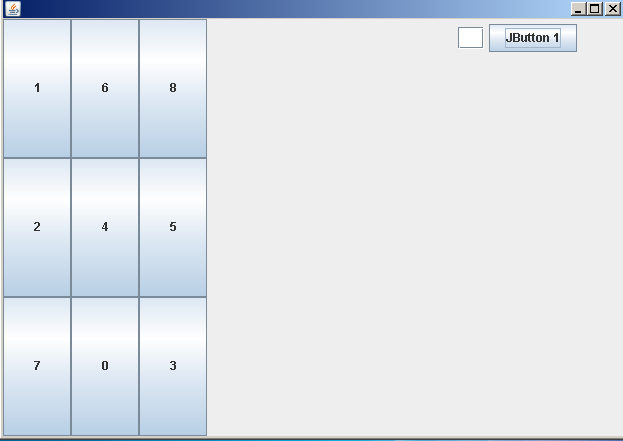


作業 (5*5)


// with event
//Swing, JButton類別 有ActionListener
//Swing, JButton類別
import java.awt.*;
import java.awt.event.*;
import javax.swing.*;
public class SwingTestEvent extends JFrame implements ActionListener
{
//static JFrame myfrm=new JFrame("JButton class"); // Java Class JFrame
//static AwtTestEvent myfrm=new AwtTestEvent("JFrame 1 "); // Java Class JFrame
static JTextField tbx1=new JTextField(2); // 建立1文字方塊物件
static JButton buttons[]=new JButton[26];
static JLabel  labels[]=new JLabel [26];
public static void main(String args[])
{
SwingTestEvent myfrm=new SwingTestEvent();

String numbers[]  = {"0", "1", "2", "3", "4", "5", "6", "7", "8","9", "10", "11", "12", "13", "14", "15", "16", "17", "18","19", "20", "21", "22", "23", "24"};
FlowLayout flow=new FlowLayout();
GridLayout grid12= new GridLayout(1,2);
GridLayout grid33= new GridLayout(5,5);
myfrm.setLayout(grid12);
myfrm.setSize(450,450);
JPanel p1 = new JPanel(grid33); //實作  panel 1
for (int i = 0; i < numbers.length; i++)
{
buttons[i] = new JButton(numbers[i]); // create buttons
p1.add(buttons[i], grid33); // 在 panel 1內加入按鈕陣列
}

myfrm.add(p1); // 在視窗myfrm 內加入 panel 1
JPanel p3 = new JPanel(grid33); //實作  panel 3
for (int i = 0; i < numbers.length; i++)
{
labels[i] = new JLabel(); // create labels
p3.add(labels[i], grid33); // 在 panel 1內加入按鈕陣列
}
myfrm.add(p3); // 在視窗myfrm 內加入 panel 3

JPanel p2 = new JPanel(flow); //實作  panel 2
JButton btn1=new JButton("JButton 1"); // 建立按鈕物件 btn1
btn1.addActionListener(myfrm);
p2.add(tbx1); // 在 panel 2內加入文字方塊
p2.add(btn1); // 在 panel 2內加入按鈕

myfrm.add(p2); // 在視窗myfrm 內加入 panel 2


myfrm.setVisible(true);
}
public void actionPerformed(ActionEvent e)
{
String numbers[]  = {"0", "1", "2", "3", "4", "5", "6", "7", "8","9", "10", "11", "12", "13", "14", "15", "16", "17", "18","19", "20", "21", "22", "23", "24"};
String stringValue;
int rm;
String tmp;
//stringValue=tbx1.getText();
//int intValue = Integer.parseInt(stringValue);
//System.out.println(intValue);
//labels[intValue].setText(stringValue);

for (int i = 0; i < 25; i++)
{
int j=24-i;
rm=(int)(Math.random()*(25-i));
System.out.println(rm);
tmp=numbers[j];
numbers[j]=numbers[rm];
numbers[rm]=tmp;
}


for (int i = 0; i < 25; i++)
{


buttons[j].setLabel(numbers[j]);
System.out.println(numbers[j]);
}


//tbx1.setText(numbers[0]);
//buttons[rm].setBackground(Color.blue);
//labels[rm].setText(numbers[0]);

}
}


加分題
輸入100
25個按鈕會從1-100隨機選25個


// with event
//Swing, JButton類別 有ActionListener
//Swing, JButton類別
import java.awt.*;
import java.awt.event.*;
import javax.swing.*;
public class SwingTestEvent extends JFrame implements ActionListener
{
//static JFrame myfrm=new JFrame("JButton class"); // Java Class JFrame
//static AwtTestEvent myfrm=new AwtTestEvent("JFrame 1 "); // Java Class JFrame
static JTextField tbx1=new JTextField(2); // 建立1文字方塊物件
static JButton buttons[]=new JButton[26];
static JLabel  labels[]=new JLabel [26];
public static void main(String args[])
{
SwingTestEvent myfrm=new SwingTestEvent();

String numbers[]  = {"0", "1", "2", "3", "4", "5", "6", "7", "8","9", "10", "11", "12", "13", "14", "15", "16", "17", "18","19", "20", "21", "22", "23", "24"};
FlowLayout flow=new FlowLayout();
GridLayout grid12= new GridLayout(1,2);
GridLayout grid33= new GridLayout(5,5);
myfrm.setLayout(grid12);
myfrm.setSize(450,450);
JPanel p1 = new JPanel(grid33); //實作  panel 1
for (int i = 0; i < numbers.length; i++)
{
buttons[i] = new JButton(numbers[i]); // create buttons
p1.add(buttons[i], grid33); // 在 panel 1內加入按鈕陣列
}

myfrm.add(p1); // 在視窗myfrm 內加入 panel 1
JPanel p3 = new JPanel(grid33); //實作  panel 3
for (int i = 0; i < numbers.length; i++)
{
labels[i] = new JLabel(); // create labels
p3.add(labels[i], grid33); // 在 panel 1內加入按鈕陣列
}
myfrm.add(p3); // 在視窗myfrm 內加入 panel 3

JPanel p2 = new JPanel(flow); //實作  panel 2
JButton btn1=new JButton("JButton 1"); // 建立按鈕物件 btn1
btn1.addActionListener(myfrm);
p2.add(tbx1); // 在 panel 2內加入文字方塊
p2.add(btn1); // 在 panel 2內加入按鈕

myfrm.add(p2); // 在視窗myfrm 內加入 panel 2


myfrm.setVisible(true);
}
public void actionPerformed(ActionEvent e)
{
String numbers[]=new String[101];
for (int i = 0; i <100; i++)
{
numbers[i]=String.valueOf(i);
}

String stringValue;
int rm;
String tmp;
stringValue=tbx1.getText();
int intValue = Integer.parseInt(stringValue);
//System.out.println(intValue);
//labels[intValue].setText(stringValue);

for (int i = 0; i < 25; i++)
{
int j=24-i;
rm=(int)(Math.random()*intValue);
System.out.println(rm);

tmp=numbers[j];
numbers[j]=numbers[rm];
numbers[rm]=tmp;

}

for (int i = 0; i < 25; i++)
{
buttons[i].setLabel(numbers[i]);
System.out.println(numbers[i]);

}


//buttons[rm].setBackground(Color.blue);
//labels[rm].setText(numbers[0]);

}
}


2011年4月1日 星期五

java - 按鈕排列(升級版)

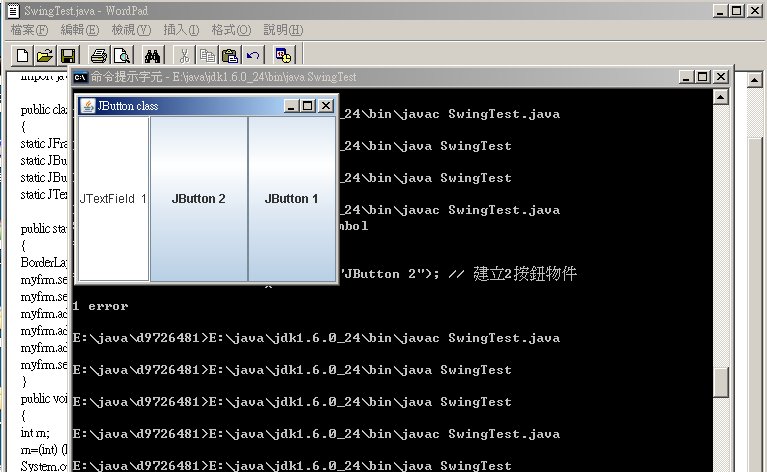
將Frame改成 JFrame


//Swing, Button Class
import java.awt.*;
import java.awt.event.*;
import javax.swing.JFrame;

public class SwingTest extends JFrame
{
static JFrame myfrm=new JFrame("Button class"); // Java Class JFrame
static Button btn1=new Button("Button 1"); // 建立1按鈕物件
static Button btn2=new Button("Button 2"); // 建立2按鈕物件
static TextField tbx1=new TextField("TextField  1"); // 建立1文字方塊物件

public static void main(String args[])
{
BorderLayout border=new BorderLayout();
myfrm.setLayout(border);
myfrm.setSize(250,150);
myfrm.add(btn1, border.EAST); // 在視窗內加入按鈕1
myfrm.add(btn2, border.CENTER); // 在視窗內加入按鈕2
myfrm.add(tbx1, border.WEST); // 在視窗內加入按鈕2
myfrm.setVisible(true);
}
public void actionPerformed(ActionEvent e)
{
int rn;
rn=(int) (Math.random()*49) ;
System.out.println(rn );
}
}


再來將Button也改成JButton
將TextField也改成JTextField


//Swing, JButton Class
import java.awt.*;
import java.awt.event.*;
import javax.swing.*;

public class SwingTest extends JFrame
{
static JFrame myfrm=new JFrame("JButton class"); // Java Class JFrame
static JButton btn1=new JButton("JButton 1"); // 建立1按鈕物件
static JButton btn2=new JButton("JButton 2"); // 建立2按鈕物件
static JTextField tbx1=new JTextField("JTextField  1"); // 建立1文字方塊物件

public static void main(String args[])
{
BorderLayout border=new BorderLayout();
myfrm.setLayout(border);
myfrm.setSize(250,150);
myfrm.add(btn1, border.EAST); // 在視窗內加入按鈕1
myfrm.add(btn2, border.CENTER); // 在視窗內加入按鈕2
myfrm.add(tbx1, border.WEST); // 在視窗內加入按鈕2
myfrm.setVisible(true);
}
public void actionPerformed(ActionEvent e)
{
int rn;
rn=(int) (Math.random()*49) ;
System.out.println(rn );
}
}

改變按鈕的排列
加入GridLayout


//Swing, JButton Class
import java.awt.*;
import java.awt.event.*;
import javax.swing.*;

public class SwingTest extends JFrame
{
static JFrame myfrm=new JFrame("JButton class"); // Java Class JFrame
static JButton btn1=new JButton("JButton 1"); // 建立1按鈕物件
static JButton btn2=new JButton("JButton 2"); // 建立2按鈕物件
static JTextField tbx1=new JTextField("JTextField  1"); // 建立1文字方塊物件

public static void main(String args[])
{
//BorderLayout border=new BorderLayout();
GridLayout border=new GridLayout(0,2);
myfrm.setLayout(border);
myfrm.setSize(250,150);
myfrm.add(btn1, border); // 在視窗內加入按鈕1
myfrm.add(btn2, border); // 在視窗內加入按鈕2
myfrm.add(tbx1, border); // 在視窗內加入按鈕2

/*
String[] numbers = {"0", "1", "2", "3", 4", "5", "6", "7", "8", "9"}; // goes on to 26
JButtons[] buttons = new JButton(numbers.length)
// create instance of each button
for (int i = 0; i < numbers.length; i++)
{
buttons[i] = new JButton(numbers[i]); // create buttons
}
*/


myfrm.setVisible(true);
}
public void actionPerformed(ActionEvent e)
{
int rn;
rn=(int) (Math.random()*49) ;
System.out.println(rn );
}
}

再打上另外的指令
更方便也更簡單的增加按鈕


//Swing, JButton Class
import java.awt.*;
import java.awt.event.*;
import javax.swing.*;

public class SwingTest extends JFrame
{
static JFrame myfrm=new JFrame("JButton class"); // Java Class JFrame
static JButton btn1=new JButton("JButton 1"); // 建立1按鈕物件
static JButton btn2=new JButton("JButton 2"); // 建立2按鈕物件
static JTextField tbx1=new JTextField("JTextField  1"); // 建立1文字方塊物件

public static void main(String args[])
{
//BorderLayout border=new BorderLayout();
GridLayout border=new GridLayout(0,2);

String numbers[] = {"0", "1", "2", "3"," 4", "5", "6", "7", "8", "9"}; // goes on to 26
JButton buttons[]=new JButton[10];

myfrm.setLayout(border);
myfrm.setSize(250,150);

myfrm.add(btn1, border); // 在視窗內加入按鈕1
myfrm.add(btn2, border); // 在視窗內加入按鈕2
myfrm.add(tbx1, border); // 在視窗內加入按鈕2


// create instance of each button
for (int i = 0; i < numbers.length; i++)
{
buttons[i] = new JButton(numbers[i]); // create buttons
myfrm.add(buttons[i], border); // 在視窗內加入按鈕1
}


myfrm.setVisible(true); 
}
public void actionPerformed(ActionEvent e) 
{ 
int rn;
rn=(int) (Math.random()*49) ; 
System.out.println(rn );
}
}

改成3*3矩陣


//Swing, JButton Class
import java.awt.*;
import java.awt.event.*;
import javax.swing.*;


public class SwingTest extends JFrame
{
static JFrame myfrm=new JFrame("JButton class"); // Java Class JFrame


public static void main(String args[])
{
//BorderLayout border=new BorderLayout();
GridLayout border=new GridLayout(3,3);


String numbers[] = {"0", "1", "2", "3"," 4", "5", "6", "7", "8"}; // goes on to 26
JButton buttons[]=new JButton[10];


myfrm.setLayout(border);
myfrm.setSize(250,150);


// create instance of each button
for (int i = 0; i < numbers.length; i++)
{
buttons[i] = new JButton(numbers[i]); // create buttons
myfrm.add(buttons[i], border); // 在視窗內加入按鈕1
}


myfrm.setVisible(true); 
}
public void actionPerformed(ActionEvent e) 
{ 
int rn;
rn=(int) (Math.random()*49) ; 
System.out.println(rn );
}
}
增加panel


//Swing, JButton Class
import java.awt.*;
import java.awt.event.*;
import javax.swing.*;

public class SwingTest extends JFrame
{
static JFrame myfrm=new JFrame("JButton class"); // Java Class JFrame

public static void main(String args[])
{

//BorderLayout border=new BorderLayout();
GridLayout border=new GridLayout(3,3);
JPanel p = new JPanel(border); //PREFERRED!
myfrm.add(p);

String numbers[] = {"0", "1", "2", "3"," 4", "5", "6", "7", "8"}; // goes on to 26
JButton buttons[]=new JButton[10];

myfrm.setLayout(border);
myfrm.setSize(250,150);


// create instance of each button
for (int i = 0; i < numbers.length; i++)
{
buttons[i] = new JButton(numbers[i]); // create buttons
myfrm.add(buttons[i], border); // 在視窗內加入按鈕1
}


myfrm.setVisible(true); 
}
public void actionPerformed(ActionEvent e) 
{ 
int rn;
rn=(int) (Math.random()*49) ; 
System.out.println(rn );
}
}


------------------------------------------------------------------------------------------------------------------------------------


// with event
//AWT, JButton類別 有ActionListener
//AWT, JButton類別
import java.awt.*;
import java.awt.event.*;
import javax.swing.*;


public class AwtTestEvent extends JFrame implements ActionListener
{
//static JJFrame myfrm=new JFrame("JButton class"); // Java Class JFrame
//static AwtTestEvent myfrm=new AwtTestEvent("JFrame 1 "); // Java Class JFrame
static JButton btn1=new JButton("JButton 1"); // 建立1按鈕物件
static JTextField tbx1=new JTextField("          "); // 建立1文字方塊物件


public static void main(String args[])
{
String numbers[] = {"0", "1", "2", "3"," 4", "5", "6", "7", "8"}; // goes on to 26
JButton buttons[]=new JButton[10];


AwtTestEvent myfrm=new AwtTestEvent();
GridLayout border1=new GridLayout(3,3);
GridLayout border2=new GridLayout(2,1);


JPanel p1 = new JPanel(border1); //PREFERRED!
JPanel p2 = new JPanel(border2); //PREFERRED!


// create instance of each button
for (int i = 0; i < numbers.length; i++)
{
buttons[i] = new JButton(numbers[i]); // create buttons
p1.add(buttons[i], border1); // 在視窗內加入按鈕1
}
myfrm.add(p1);


myfrm.add(p2);


myfrm.setLayout(border1);
myfrm.setLayout(border2);


myfrm.setSize(250,150);
btn1.addActionListener(myfrm);


p2.add(btn1, border2); // 在視窗內加入按鈕1
p2.add(tbx1, border2); // 在視窗內加入文字方塊1; 


myfrm.setVisible(true); 


}
public void actionPerformed(ActionEvent e) 
{ 
String sr;
sr=tbx1.getText();
System.out.println(sr);
}
}


2011年3月25日 星期五

java - 隨機選號2


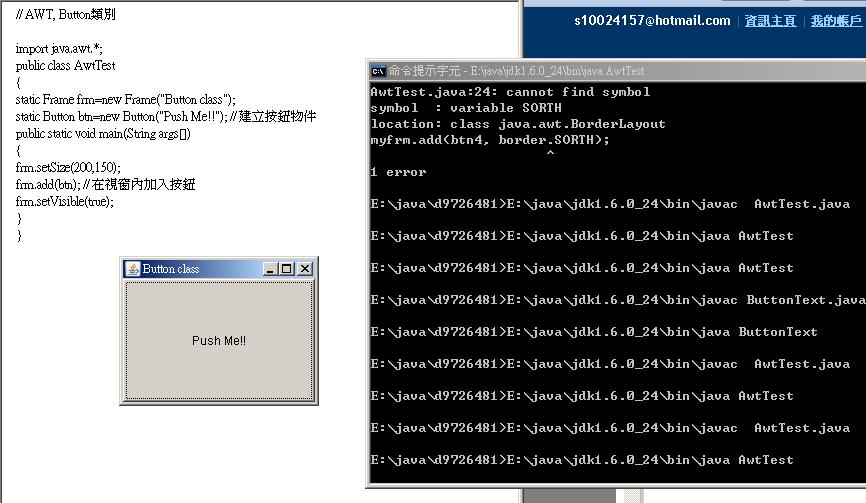
1.建立按鈕

// AWT, Button類別

import java.awt.*;
public class AwtTest
{
static Frame frm=new Frame("Button class");
static Button btn=new Button("Push Me!!"); // 建立按鈕物件
public static void main(String args[])
{
frm.setSize(200,150);
frm.add(btn); // 在視窗內加入按鈕
frm.setVisible(true);
}
}


2.再來是建立多個按鈕


// AWT, Button類別

import java.awt.*;
public class AwtTest
{
static Frame myfrm=new Frame("Button class");
static Button btn1=new Button("Button 1"); // 建立按鈕物件
static Button btn2=new Button("Button 2");
static Button btn3=new Button("Button 3");
static Button btn4=new Button("Button 4");
public static void main(String args[])
{
BorderLayout border=new BorderLayout();
myfrm.setLayout(border);

myfrm.setSize(200,150);
myfrm.add(btn1); // 在視窗內加入按鈕
myfrm.add(btn2);
myfrm.add(btn3);
myfrm.add(btn4);

myfrm.setVisible(true);
}
}


3.分開配置按鈕


// AWT, Button類別

import java.awt.*;
public class AwtTest
{
static Frame myfrm=new Frame("Button class");
static Button btn1=new Button("Button 1"); // 建立按鈕物件
static Button btn2=new Button("Button 2");
static Button btn3=new Button("Button 3");
static Button btn4=new Button("Button 4");
public static void main(String args[])
{
BorderLayout border=new BorderLayout();
myfrm.setLayout(border);

myfrm.setSize(200,150);
myfrm.add(btn1, border.WEST); // 在視窗內加入按鈕
myfrm.add(btn2, border.EAST);
myfrm.add(btn3, border.NORTH);
myfrm.add(btn4, border.SOUTH);

myfrm.setVisible(true);
}
}


4.建立一個文件


// AWT, Button類別

import java.awt.*;
public class AwtTest
{
static Frame myfrm=new Frame("Button class");
static Button btn1=new Button("Button 1"); // 建立按鈕1物件
static Button btn2=new Button("Button 2"); // 建立按鈕2物件
static Button btn3=new Button("Button 3"); // 建立按鈕3物件
static Button btn4=new Button("Button 4");// 建立按鈕4物件
static TextField txf1=new TextField("JAVA 學習!!");// 建立文字1物件
public static void main(String args[])
{
BorderLayout border=new BorderLayout();
myfrm.setLayout(border);

myfrm.setSize(300,150);
myfrm.add(btn1, border.WEST); // 在視窗內加入按鈕1
myfrm.add(btn2, border.EAST); // 在視窗內加入按鈕2
myfrm.add(btn3, border.NORTH); // 在視窗內加入按鈕3
myfrm.add(btn4, border.SOUTH); // 在視窗內加入按鈕4
myfrm.add(txf1, border.CENTER); // 在視窗內加入文件1


myfrm.setVisible(true);
}
}


5.使按鍵可以印出數字


// AWT, Button類別

import java.awt.event.*;
import java.awt.*;
public class AwtTest extends Frame implements ActionListener
{
//static Frame myfrm=new Frame("Button class");
//static AwtTest myfrm=new AwtTest("Button class");

static Button btn1=new Button("Button 1"); // 建立按鈕1物件
static Button btn2=new Button("Button 2"); // 建立按鈕2物件
static Button btn3=new Button("Button 3"); // 建立按鈕3物件
static Button btn4=new Button("Button 4");// 建立按鈕4物件
static TextField txf1=new TextField("JAVA 學習!!");// 建立文字1物件
public static void main(String args[])
{
AwtTest myfrm=new AwtTest();
BorderLayout border=new BorderLayout();
myfrm.setLayout(border);
btn1.addActionListener(myfrm);
myfrm.setSize(300,150);
myfrm.add(btn1, border.WEST); // 在視窗內加入按鈕1
myfrm.add(btn2, border.EAST); // 在視窗內加入按鈕2
myfrm.add(btn3, border.NORTH); // 在視窗內加入按鈕3
myfrm.add(btn4, border.SOUTH); // 在視窗內加入按鈕4
myfrm.add(txf1, border.CENTER); // 在視窗內加入文件1
myfrm.setVisible(true);
}
public void actionPerformed(ActionEvent e)
{
int rn;
rn=(int) (Math.random()*49) ;
System.out.println(rn );
}
}


6.將印出的數字也印在文件方格上


// AWT, Button類別

import java.awt.event.*;
import java.awt.*;
public class AwtTest extends Frame implements ActionListener
{
//static Frame myfrm=new Frame("Button class");
static AwtTest myfrm=new AwtTest();

static Button btn1=new Button("Button 1"); // 建立按鈕1物件
static Button btn2=new Button("Button 2"); // 建立按鈕2物件
static Button btn3=new Button("Button 3"); // 建立按鈕3物件
static Button btn4=new Button("Button 4");// 建立按鈕4物件
static TextField txf1=new TextField("JAVA 學習!!");// 建立文字1物件
public static void main(String args[])
{
//AwtTest myfrm=new AwtTest();
BorderLayout border=new BorderLayout();
myfrm.setLayout(border);
btn1.addActionListener(myfrm);
myfrm.setSize(300,150);
myfrm.add(btn1, border.WEST); // 在視窗內加入按鈕1
myfrm.add(btn2, border.EAST); // 在視窗內加入按鈕2
myfrm.add(btn3, border.NORTH); // 在視窗內加入按鈕3
myfrm.add(btn4, border.SOUTH); // 在視窗內加入按鈕4
myfrm.add(txf1, border.CENTER); // 在視窗內加入文件1
myfrm.setVisible(true);
}
public void actionPerformed(ActionEvent e)
{
int rn;
rn=(int) (Math.random()*49) ;
String stringValue = Integer.toString(rn);
System.out.println(rn );
txf1.setText(stringValue);

}
}


作業 : 在文字方格上一次顯示7個數字


// AWT, Button類別

import java.awt.event.*;
import java.awt.*;
public class AwtTest extends Frame implements ActionListener
{
//static Frame myfrm=new Frame("Button class");
static AwtTest myfrm=new AwtTest();

static Button btn1=new Button("隨機選號"); // 建立按鈕1物件
static TextField txf1=new TextField("Sample Ramdon1");// 建立文字1物件
static TextField txf2=new TextField("Sample Ramdon2");
static TextField txf3=new TextField("Sample Ramdon3");
static TextField txf4=new TextField("Sample Ramdon4");
static TextField txf5=new TextField("Sample Ramdon5");
static TextField txf6=new TextField("Sample Ramdon6");
static TextField txf7=new TextField("Sample Ramdon7");
public static void main(String args[])
{
//AwtTest myfrm=new AwtTest();
FlowLayout flow=new FlowLayout();
myfrm.setLayout(new FlowLayout());
btn1.addActionListener(myfrm);
myfrm.setSize(300,150);
myfrm.add(btn1); // 在視窗內加入按鈕1
myfrm.add(txf1); // 在視窗內加入文件1
myfrm.add(txf2);
myfrm.add(txf3);
myfrm.add(txf4);
myfrm.add(txf5);
myfrm.add(txf6);
myfrm.add(txf7);
myfrm.setVisible(true);
}
public void actionPerformed(ActionEvent e)
{
int rn,rn1,rn2,rn3,rn4,rn5,rn6,rn7;
rn1=(int) (Math.random()*49+1) ;
rn2=(int) (Math.random()*49+1) ;
rn3=(int) (Math.random()*49+1) ;
rn4=(int) (Math.random()*49+1) ;
rn5=(int) (Math.random()*49+1) ;
rn6=(int) (Math.random()*49+1) ;
rn7=(int) (Math.random()*49+1) ;

String stringValue1 = Integer.toString(rn1);
String stringValue2 = Integer.toString(rn2);
String stringValue3 = Integer.toString(rn3);
String stringValue4 = Integer.toString(rn4);
String stringValue5 = Integer.toString(rn5);
String stringValue6 = Integer.toString(rn6);
String stringValue7 = Integer.toString(rn7);
/*
System.out.println(rn1);
System.out.println(rn2);
System.out.println(rn3);
System.out.println(rn4);
System.out.println(rn5);
System.out.println(rn6);
System.out.println(rn7);
*/

txf1.setText(stringValue1);
txf2.setText(stringValue2);
txf3.setText(stringValue3);
txf4.setText(stringValue4);
txf5.setText(stringValue5);
txf6.setText(stringValue6);
txf7.setText(stringValue7);

}
}


加分題 : 

// AWT, Button類別

import java.awt.event.*;
import java.awt.*;
public class AwtTest extends Frame implements ActionListener 
{
//static Frame myfrm=new Frame("Button class");
static AwtTest myfrm=new AwtTest();

static Button btn1=new Button("隨機選號"); // 建立按鈕1物件
static TextField txf1=new TextField("Sample Ramdon1");// 建立文字1物件
static TextField txf2=new TextField("Sample Ramdon2");
static TextField txf3=new TextField("Sample Ramdon3");
static TextField txf4=new TextField("Sample Ramdon4");
static TextField txf5=new TextField("Sample Ramdon5");
static TextField txf6=new TextField("Sample Ramdon6");
static TextField txf7=new TextField("Sample Ramdon7");
public static void main(String args[])
{
//AwtTest myfrm=new AwtTest();
FlowLayout flow=new FlowLayout();
myfrm.setLayout(new FlowLayout());
btn1.addActionListener(myfrm);
myfrm.setSize(300,150);
myfrm.add(btn1); // 在視窗內加入按鈕1
myfrm.add(txf1); // 在視窗內加入文件1
myfrm.add(txf2); 
myfrm.add(txf3); 
myfrm.add(txf4); 
myfrm.add(txf5);
myfrm.add(txf6); 
myfrm.add(txf7); 
myfrm.setVisible(true); 
}
public void actionPerformed(ActionEvent e) 
{ 
int rn,rn1,rn2,rn3,rn4,rn5,rn6,rn7;
rn1=(int) (Math.random()*49+1) ; 
rn2=(int) (Math.random()*49+1) ; 
rn3=(int) (Math.random()*49+1) ; 
rn4=(int) (Math.random()*49+1) ; 
rn5=(int) (Math.random()*49+1) ; 
rn6=(int) (Math.random()*49+1) ; 
rn7=(int) (Math.random()*49+1) ; 

String stringValue1 = Integer.toString(rn1); 
String stringValue2 = Integer.toString(rn2); 
String stringValue3 = Integer.toString(rn3); 
String stringValue4 = Integer.toString(rn4); 
String stringValue5 = Integer.toString(rn5); 
String stringValue6 = Integer.toString(rn6); 
String stringValue7 = Integer.toString(rn7); 
/*
System.out.println(rn1);
System.out.println(rn2);
System.out.println(rn3);
System.out.println(rn4);
System.out.println(rn5);
System.out.println(rn6);
System.out.println(rn7);
*/

txf1.setText(stringValue1);
txf2.setText(stringValue2);
txf3.setText(stringValue3);
txf4.setText(stringValue4);
txf5.setText(stringValue5);
txf6.setText(stringValue6);
txf7.setText(stringValue7);
txf7.setBackground(Color.RED);

}
}